“Yes, and don't ask again.” That is the option we pick when a code assistant asks for the tenth time for permission to run the same command. A click of convenience, nothing more. Except that click can leave your database password in plain text in a public repository. That is what security vendor Apiiro has just shown, in a study reported on 7 November by The Hacker News.
What the study shows
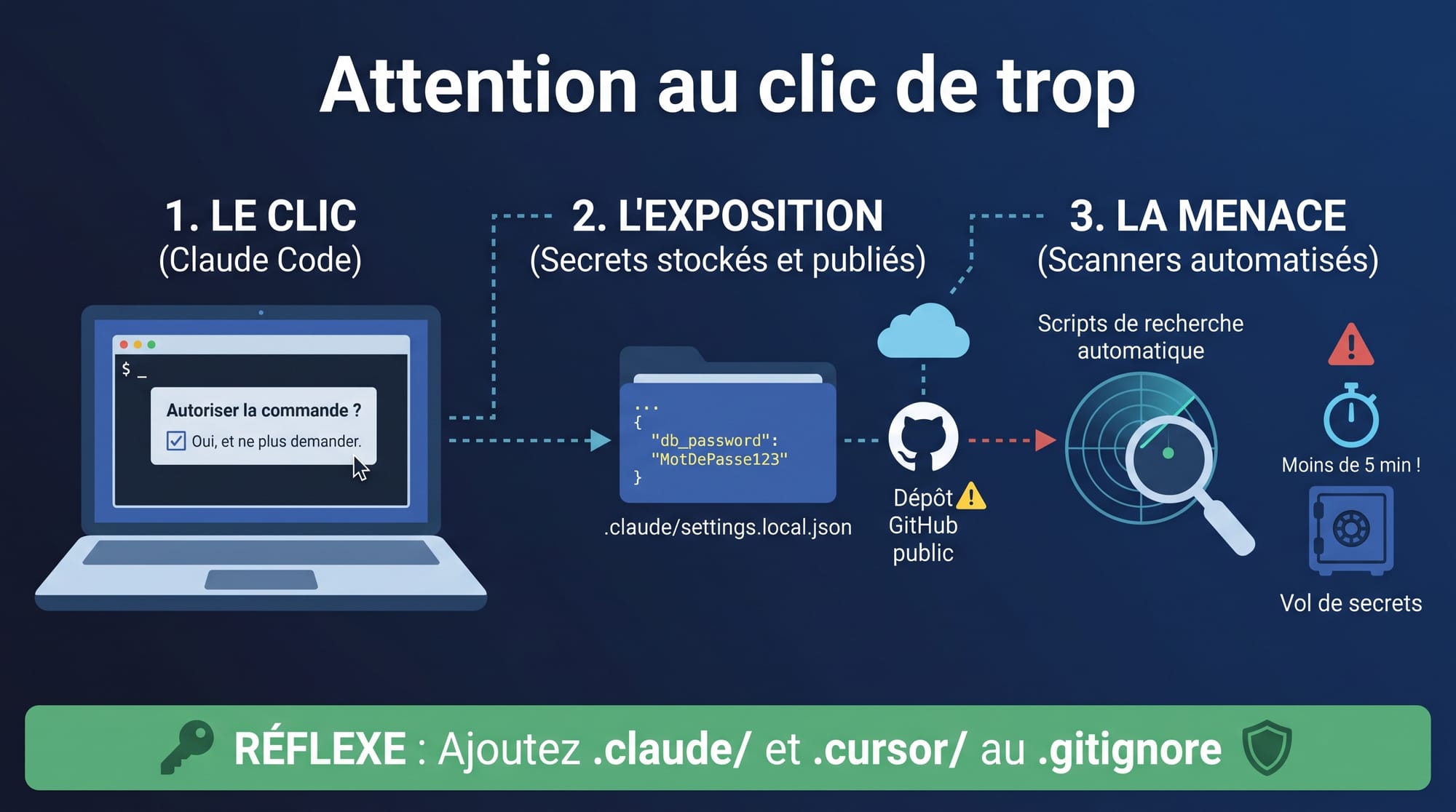
Claude Code, Anthropic's programming assistant, asks for permission before running most commands. When you answer “Yes, and don't ask again”, it records an authorisation rule in a project file: .claude/settings.local.json. Sometimes that rule is a generic pattern (for instance “all tests”), sometimes it is the exact command. And if that command contained a password or a token, it is saved as is, in plain text.
Apiiro found 104,185 public copies of this file on GitHub. 1,122 contain at least one secret, for a total of 1,379 distinct secrets:
- 379 database passwords (more than a third of the secrets open a database directly);
- 43 SSH credentials for public servers;
- 42 GitHub, GitLab or npm tokens;
- 23 AWS keys.
The researchers did not test whether these secrets still work, but one company they notified confirmed its key was active. Another striking point: common secret scanners miss some of them (gitleaks flags 564, TruffleHog 643, and 215 escape both), because a password slipped into a command line does not look like a key in a known format.
Why it is worse than before
The same week, Microsoft Threat Intelligence described attackers using an offensive AI agent framework, ARTEX, to query GitHub at scale in search of secrets, then put them to use. In one observed case, the agent went from a GitHub search to stealing the contents of an Azure Key Vault in five minutes.
Hunting for secrets in public repositories is nothing new. What changes is the speed: where a human used to be needed to sort and exploit, an agent chains everything on its own, corrects its mistakes and carries on. The delay between a leak and its exploitation is now measured in minutes.
What I see in the field
When I work on projects where teams use code assistants, I find that the agents' configuration folders (.claude/, .cursor/, .gemini/…) are rarely covered by the security policy. People think about the code, about .env files, rarely about these hidden files the agent writes itself. And Claude Code does not add them to the project's .gitignore: its protection stays on the developer's machine.
For a company, the stakes are not only technical. It is a risk of data leakage, of a hijacked cloud bill, and of non-compliance if personal data is affected.
My reflexes
- Rotate first, clean up second: deleting a file achieves nothing, it stays in the git history and in forks. Any exposed secret must be treated as compromised.
- Search everywhere: the organisation's repositories, but also their history, for .claude/settings.local.json and .claude/settings.json files.
- Add the agents' folders to the project's .gitignore and to secret scanning, at pre-commit and in the continuous integration pipeline.
- Never type a secret in a command: go through environment variables or a secrets manager.
- Allow families of commands, not single commands that carry credentials.
- Remove secrets at the root where possible, for instance with managed identities in the cloud.
In conclusion
Code assistants save precious time, and I recommend them. But they write files, make decisions and remember our choices. Keeping them in check takes real governance: clear rules, suitable detection tools and regular review. If you want to take stock of how code agents are used in your teams, let's talk.
Sources
- The Hacker News, Apiiro study: https://thehackernews.com/2026/11/claude-codes-dont-ask-again-file.html
- Microsoft Threat Intelligence, ARTEX: https://www.microsoft.com/en-us/security/blog/2026/11/05/threat-actors-use-agentic-ai-tooling-to-find-and-abuse-exposed-secrets/